


For more than a decade, Google Chrome has been the undisputed leader in the browser world. Its speed, simplicity, and strong compatibility with web standards helped it dominate the market. But as Chrome has grown heavier, more resource-intensive, and deeply intertwined with Google’s data ecosystem, a new generation of challengers has appeared. Among them, Zen is one of the most promising.
What Is Zen?
Zen is an all-purpose, open-source browser built on Mozilla Firefox’s Gecko engine and layers on a sleek, Arc-like interface with powerful productivity tools. While Chrome’s design philosophy focuses on simplicity and minimalism, Zen aims to make the browser a workspace hub, offering features that help users organize tabs, multitask, and move between projects effortlessly. Designed with modern workflows, privacy, and aesthetics in mind, Zen creates a calmer, more efficient browsing experience, something many users feel Chrome lacks today.
Zen appeals to users who:
- handle dozens of tabs and want better organization
- need quick, fluid navigation between multiple tasks
- prioritize privacy and want alternatives to Chromium
- appreciate visual polish, themes, and customizable UI layouts
Key Features That Set Zen Apart

Zen is built around one idea that your browser should help you think and work better, not overwhelm you. To achieve that, it comes with several standout features.
1. Vertical Tabs and Compact Sidebar
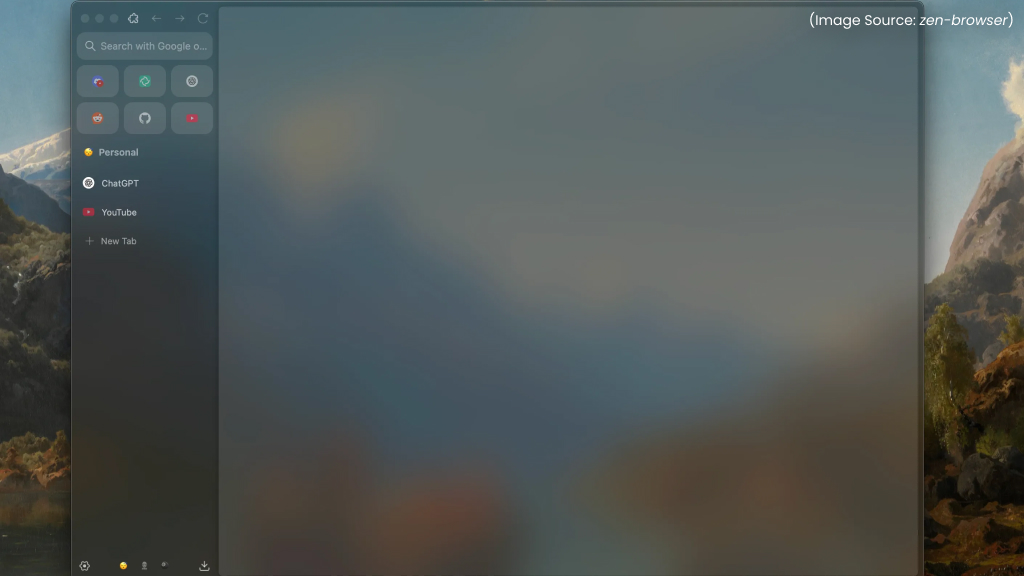
Zen replaces the traditional horizontal tab bar with a clean, efficient vertical tab layout, giving users more space and a clearer view of their open pages. This design is especially helpful for people who juggle multiple tabs, as titles remain visible instead of shrinking into tiny icons.
The vertical sidebar can also be switched to a compact auto-hide mode, which keeps the interface minimal and distraction-free. It appears only when needed, allowing the webpage to take center stage. Together, vertical tabs and the compact sidebar create an organized, clutter-free browsing experience that feels modern, spacious, and highly intuitive.
2. Workspaces for Better Organization
Zen’s Workspaces feature helps users separate different areas of their digital life with ease. Instead of keeping dozens of unrelated tabs in one crowded window, you can create dedicated spaces for work, study, research, entertainment, or personal tasks. Each workspace maintains its own set of tabs, themes, and layout, allowing you to switch contexts instantly without losing focus.
This structured approach reduces clutter and makes multitasking far more manageable. Whether you’re handling school assignments, managing office projects, or exploring hobbies, Workspaces let you stay organized and mentally clear, turning the browser into a neatly arranged, distraction-free environment.
3. Split View for Multitasking
Zen’s Split View feature transforms your browser into a powerful multitasking workspace. Instead of switching between tabs repeatedly, you can view two websites side-by-side within the same window. This is incredibly useful for students comparing research sources, professionals referencing documents while drafting emails, or anyone who needs simultaneous access to multiple pages.
Split View creates a more fluid workflow, saving time and reducing mental friction. By keeping both pages visible and interactive, Zen enables smarter browsing and boosts productivity. It turns the browser into a true dual-pane workspace, something Chrome still lacks, making multitasking feel natural, efficient, and seamless.
4. Glance
Zen’s Glance feature is designed for quick, effortless browsing without cluttering your tab bar. Instead of opening every link in a new tab, Glance allows you to preview pages in a temporary pop-up window that sits above your current screen. This is perfect for checking definitions, skimming articles, viewing product details, or exploring search results without losing your place.
Once you’re done, simply close the preview and continue where you left off, no extra tabs to clean up later. Glance keeps your workflow smooth and your workspace tidy, making browsing faster, lighter, and far more intuitive than traditional tab switching.
5. Customizable Themes and Zen Mods
Zen offers a rich visual experience through its Customizable Themes and Zen Mods, allowing users to shape the browser’s appearance to suit their personal style. From subtle gradients and soft textures to bold color palettes and dynamic layouts, Zen’s theming system brings a level of customization rarely seen in mainstream browsers.
Zen Mods, created by both the community and the developers, let you apply unique designs, interface tweaks, and playful visual elements with a single click. Whether you prefer a calming workspace or a vibrant creative canvas, these customization options make browsing feel more personal, expressive, and enjoyable every day.
6. Privacy-Friendly by Default
Zen is built on a strong commitment to user privacy, ensuring that your browsing activity remains yours alone. Unlike browsers that rely heavily on data collection or targeted advertising, Zen minimizes telemetry and avoids tracking your behavior. Its open-source nature allows anyone to inspect the code, creating a transparent environment where privacy is not just promised but proven.
Zen also includes protective features that block harmful trackers, restrict unnecessary data sharing, and offer clear, user-friendly privacy controls. With these safeguards in place from the moment you install it, Zen provides a safe, trustworthy browsing experience without requiring extra extensions or complex settings.
What Has Changed in Zen?
Zen is not just a one-off experimental project. The browser has been under active development, with regular improvements to:
- the address bar
- UI animations
- workspace switching
- split-view performance
- privacy settings
- security patches
- overall speed and memory usage
Recent updates have introduced smoother transitions, improved sidebar behavior, and more responsive keyboard shortcuts. Bugs and feature gaps are constantly being addressed, with the developer community actively contributing through GitHub.
This fast development cycle shows that Zen is not aiming to be just another Firefox fork, it’s evolving toward a polished browser ecosystem of its own.
How Zen Challenges Google Chrome
Zen doesn’t try to beat Chrome at being Chrome. Instead, it challenges Chrome in areas where users feel Chrome has become weaker, privacy, tab management, productivity, and visual design. Let’s see the ways Zen positions itself as a true competitor.
1. An Alternative to the Chromium Monopoly
Almost every major browser today, Edge, Brave, Vivaldi, Opera, Arc, is built on Chromium. This gives Google disproportionate control over how the web works.Zen stands out because it is not Chromium-based. By building on the Gecko engine:
- Zen offers genuine diversity in the browser market
- Web compatibility isn’t tied to Google’s engine decisions
- Users get a non-Chrome browsing experience
- Developers have an alternative rendering environment
This independence is one of Zen’s biggest strengths.
2. A Productivity-First Experience
Chrome is fast and simple, but offers very few built-in tools for power users. Zen fills this gap through:
- split-screen browsing
- tab previews
- sidebar navigation
- workspace containers
- keyboard-focused actions
- multitasking-oriented UI
For students, researchers, writers, and developers, these features make day-to-day browsing more fluid and efficient. Zen integrates these tools into the core experience, while Chrome expects users to install extensions for everything.
3. A Strong Privacy Message
Chrome is deeply connected to Google, a company built on advertising and data analytics. Even when Chrome offers privacy settings, many users remain skeptical. Zen takes the opposite route:
- minimal telemetry
- open-source code
- privacy-focused defaults
- no data collection for marketing
For users who want a browser that works for them, not for advertisers, Zen’s message is compelling.
4. A Beautiful, Modern UI
Chrome’s interface has barely evolved in more than a decade. Zen, on the other hand, embraces design innovation:
- floating sidebars
- elegant theming
- smooth transitions
- modern typography
- customizable layouts
5. A Community-Driven Future
As Zen is open-source, its growth depends on community collaboration. This also ensures:
- transparency
- innovation through contributions
- rapid feedback loops
- long-term sustainability
Challenges Zen Still Faces

Despite its strengths, Zen still has hurdles to overcome. Some of them are:
- Occasional compatibility issues with Chrome-optimized websites.
- Limited extension support compared to Chrome Web Store.
- Minor bugs due to rapid development.
- Performance quirks on some platforms.
However, with active development and community support, these challenges are steadily improving.
Zen is not just another browser, it is a thoughtful reimagining of what browsing should feel like today. With features like vertical tabs, workspaces, split view, Glance, privacy-first defaults, and rich customization, Zen offers a compelling alternative to Chrome’s one-size-fits-all approach.
By embracing open source, prioritizing user experience, and challenging the Chromium monopoly, Zen is positioning itself as a serious contender for users who want more control, better organization, and a calmer digital workspace.
If you’re seeking a fresh, efficient, privacy-friendly, and visually modern browser, Zen deserves a place on your desktop.