


Workflow automation improves operational efficiency in mid-sized enterprises by replacing manual handoffs, data entry and approvals with software-run processes. The result is fewer errors, shorter cycle times and more output from the same headcount. They are deciding where automation pays off first and how to measure the return.
Why are mid-sized enterprises turning to workflow automation?
Mid-sized companies sit in a hard middle ground. They face enterprise-level complexity (several departments, regulations, systems) without the staff or budget to absorb inefficiency. Every slow approval and re-keyed invoice lands on a team that is already stretched.
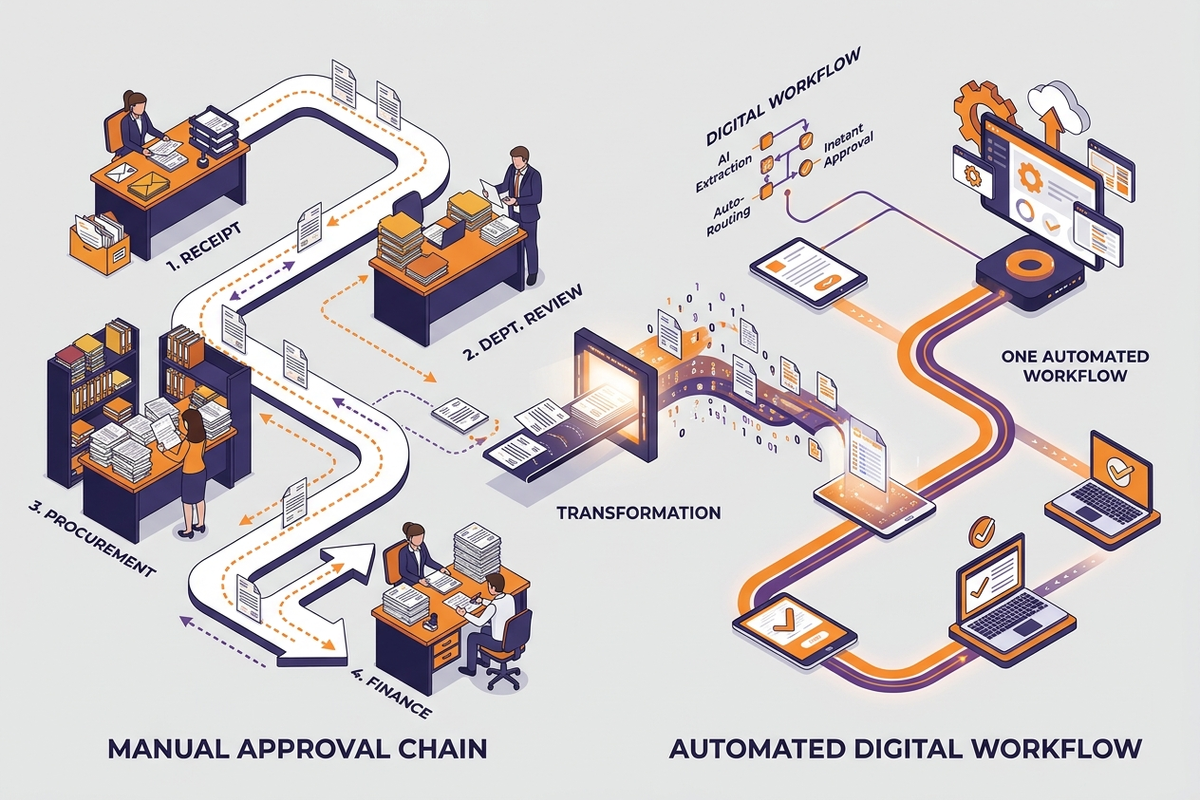
Budgets are following that pressure. The mechanism is simple: software does the repetitive steps, and your people handle the exceptions that need judgment.
A simple decision rule shows where to start: automate a process first if it follows fixed rules, passes through three or more people, and repeats every week. Invoice approval fits. Today someone re-keys each invoice into the ERP and chases sign-off by email. Automated, the invoice is captured, matched to its purchase order, and routed, and only mismatches reach a person.
What does workflow automation mean in practice, and how does it drive efficiency?
Workflow automation uses software to run repetitive, rule-based processes, such as invoice approvals or employee onboarding, as trackable digital steps that connect to your CRM and ERP. A tool that sits beside the process saves little. A workflow that replaces the manual handoff saves hours.
The gains fall into five groups: less manual effort, faster cycle times, lower operating costs, better data quality, and clearer visibility and accountability. Map each group to a pain you can name today: finance feels cycle time, HR feels handoffs, IT feels ticket volume.
Traditional automation versus AI-driven workflow automation
Traditional automation follows fixed rules: if X happens, do Y. It handles structured, predictable tasks well and stalls on exceptions. AI-driven automation reads context, weighs capacity and urgency, and improves from patterns.
In the RSM Middle Market AI Survey 2025, workflow development was the second most common use of generative AI at 45% of users. Text generation and summarization came first at 49%.
| Factor | Traditional automation | AI-driven workflow automation |
|---|---|---|
| Decision logic | Fixed if-then rules | Weighs context, capacity and urgency |
| Exceptions | Stops or escalates to a person | Proposes or takes an action within set limits |
| Improvement over time | Rules updated by hand | Learns from patterns in past cases |
| Best fit | Stable, structured tasks such as standard approvals | Variable work such as ticket routing or document review |
Why mid-sized enterprises face unique operational pressures
Mid-sized organizations outgrow their early-stage processes before they can fund a dedicated operations team. A spreadsheet and a shared inbox that worked for a small group become a bottleneck at several hundred people.
Silos deepen as headcount grows. Each manual handoff between finance, sales and operations adds waiting time and another chance for a typo.
Peers are already moving. RSM reports that 73% of middle-market AI users adopt generative AI, while 86% have partially or fully integrated AI into operations and 36% have it fully embedded across core processes. Connecting it to the workflows where your team loses the most time is still a way to pull ahead.
Reducing manual effort and human error
Manual data entry, handoffs and approvals each add time and a chance for error. Automation cuts the number of manual touchpoints. Start by listing where staff re-key data or chase approvals. Those spots are your first candidates.
Accelerating process cycle times and lowering operating costs
Automated workflows run in seconds what takes a manual team hours or days. An invoice that waited a week in an inbox can route to the right approver at once, and onboarding steps that needed chasing across departments can run in parallel.
Where does automation deliver measurable value across departments?
Finance, HR, IT and customer service benefit most. Each runs high-volume, repetitive processes that drain capacity and create compliance risk when handled by hand.
Pick the first target on two scores: how often the process runs and how much each failure costs. A daily process with frequent rework outranks a quarterly one, even if the quarterly one is more visible. Score each candidate on four points:
- Monthly volume: how many times the process runs
- Rule clarity: whether a new hire could follow the written steps
- Error cost: rework hours, late fees or compliance exposure per failure
- System access: whether the data already sits in your CRM, ERP or ticketing tool
Finance and procurement: invoice processing and purchase approvals
Accounts payable is a strong first target.
Purchase approvals gain in the same way. Routing rules send each request to the right approver by amount, department and vendor, and every step is logged for audit.
HR, IT service desk, and customer support workflows
Employee onboarding, leave requests and service desk tickets are frequent and rule-based, so automation cuts response times and the chasing that comes with them. RSM found that 50% of middle-market generative AI users saved time on information technology projects and 39% saved time on customer service.
Pick the queue with the highest ticket count and the most repeat questions. Automated routing and canned responses are simple first steps.
How can you scale without adding headcount at the same rate?
Automation lets a mid-sized company handle more transactions, open new markets and serve more customers without hiring at the pace of its workload. Test your own processes: if doubling volume would mean doubling the people who touch them, that process will break under growth.
Handling increased transaction volumes and market expansion
Automated systems process far more transactions on the same infrastructure than people can. When you enter a new market or add a location, you can copy a tested workflow instead of rebuilding it, which cuts setup time and cost.
| Growth event | Manual process | Automated workflow |
|---|---|---|
| Volume doubles | Needs more staff or overtime | Same workflow; confirm system capacity |
| New location or market | Procedures rebuilt and retrained | Template copied with local rules |
| Seasonal peak | Backlogs and temporary hires | Queue clears at machine speed |
| New compliance rule | Every team retrained | Rule updated once, applied everywhere |
Maintaining consistent service levels during rapid growth
Service levels hold under growth only when governance grows too: name an owner for every workflow and review its rules each quarter.
What are the best practices for implementing workflow automation?
Successful programs start with a well-understood workflow, involve the people who own it, and expand in phases. A big-bang rollout asks every department to change at once and leaves no clean baseline to measure against.
Plan three phases: pilot one workflow, extend to neighboring processes that share the same systems, then standardize governance across the company.
Identifying high-impact workflows and starting with pilot projects
Choose a process whose rules are written down and whose data already sits in a system you can connect to. Record the baseline before you build, so the result is a measured change and not an impression.
Common implementation mistakes and how to avoid them
Tools bought one department at a time can end up unable to share data.
Four mistakes recur: automating a broken process, choosing a complex tool for a simple workflow, and skipping the exception path. The fourth is leaving workflows undocumented, so nobody can change them when rules change. Fix the process first, then automate it. Where off-the-shelf tools cannot reach your systems, custom software development can build the missing integration.
How do you measure ROI and performance after launch?
Without metrics, automation projects lose executive support. Capture four baselines before launch:
- Cycle time per workflow, from request to completion
- Error and rework rate in data entry and processing
- Hours of staff time per week spent on the task
- Cost per transaction, manual versus automated
Performance indicators to track for automation success
In the 2025 State of Workflow Automation Report, 66.1% assessed automation success by how smoothly systems and processes run. Add one smoothness measure, such as handoff delays or rework requests, next to the financial ones.
Building a business case with clear ROI evidence
- Deloitte’s 2025 Workflow Automation Outlook reports 4–5x ROI in operational efficiencies.
- Pair that benchmark with your own cost savings and cycle-time reduction, plus an operational measure such as process smoothness or employee satisfaction.
What should you ask when evaluating workflow automation solutions?
Judge a platform on integration with your existing systems, ease of use for non-technical staff, scalability and total cost of ownership, not on its feature list. A feature you cannot connect to your ERP is a feature you will not use.
Cost follows scope: the number of systems to connect, the exception paths and the state of your data. Smart Sight Innovations helps buyers separate which workflows are genuinely worth automating from those that only sound impressive. It then builds production-grade workflow automation that integrates cleanly with the systems a business already uses.
Questions to ask vendors and internal stakeholders
Ask department heads which workflows eat the most hours and produce the most errors; that list becomes your pilot shortlist. Then put these questions to every vendor, starting with how deeply it connects to your CRM and ERP:
- Which of your systems does it connect to natively, and which need custom work?
- Who changes a rule when the business changes, and how long does that take?
- What happens to an exception the workflow cannot handle?
- What audit trail does each approval leave?
How is agentic AI changing workflow automation?
Agentic AI means software agents that plan, adapt and decide across a workflow with little human input. Deloitte’s 2026 Workflow Automation Outlook describes a shift from intelligence to initiative, where context-aware agents work across departments to finish complex tasks.
Control has not caught up. BCG reports that 42% of companies expect to give AI agents real decision-making authority by 2030, while only 5% have the controls to do so safely.
What mid-market leaders should watch as automation evolves
Only 39% of midmarket CEOs say they have realigned processes and decision-making for AI, according to BCG’s 2026 midmarket publication. Governance for agents, sometimes called AgentOps, starts with an owner, an access policy and an audit trail for each automated workflow. If you cannot name those three for one workflow today, build foundational automation first and add agents once the process is documented and measured.
How do you take the next step toward operational efficiency?
Smart Sight Innovations has built workflow automation since 2014, taking projects from proof of concept through full-scale implementation. Businesses can send Smart Sight Innovations the manual workflows that drain their team’s time.
In a first conversation, Smart Sight Innovations helps rank them by volume and rework. The conversation ends with a scoped 60–90 day plan.